One Box, No Cloud: Run a Full AI Stack for Your Office on NVIDIA DGX Spark with n8n
The n8n team has published a guide for running a full seven-model AI stack — covering text, OCR, speech, and image generation — on a single NVIDIA DGX Spark with no cloud API calls. For Indian clinics, CA firms, and law firms that cannot send client data to external servers, this architecture offers a practical path to AI-powered workflow automation that keeps all data on premises.

The n8n team has published a detailed technical guide showing how to run a complete AI automation stack — text, speech, vision, image generation, and document OCR — entirely on one NVIDIA DGX Spark device sitting in your office, without sending a single byte to a cloud API. According to the n8n blog post, every n8n workflow that today calls OpenAI, Anthropic, or any other cloud model can be rerouted to this local stack with no changes to the workflow nodes themselves.
This is a meaningful shift for any business that handles sensitive data — and a very large number of Indian businesses do.
What the NVIDIA DGX Spark Actually Is
The DGX Spark is a compact, desktop-class AI computer built around NVIDIA’s GB10 Grace Blackwell Superchip. The n8n team describes the key specification that makes this relevant: 128 GB of unified memory shared between the CPU and GPU, with a memory bandwidth of 273 GB/s. That single number determines how fast a language model generates text, because text generation is largely a memory-reading operation. The more bandwidth, the more tokens per second.
According to the n8n blog, their configuration of Qwen3.6-35B-A3B (a 35-billion-parameter mixture-of-experts model stored in NVIDIA’s 4-bit NVFP4 format) produced 120 tokens per second for a single user and 359 tokens per second in total across eight concurrent users. That is fast enough for a small office team using the system simultaneously.
The full stack the n8n team loaded onto one DGX Spark includes:
- Chat, coding, vision, and extraction: Qwen3.6-35B-A3B-NVFP4 (Apache 2.0)
- Embeddings: Qwen3-Embedding-4B (Apache 2.0)
- Reranking: Qwen3-Reranker-0.6B (Apache 2.0)
- Speech to text: Whisper-large-v3-turbo (MIT)
- Document OCR: GLM-OCR (MIT)
- Image generation: Z-Image-Turbo (Apache 2.0)
- Text to speech: Kokoro-82M (Apache 2.0)
Every model in that list carries a licence that permits commercial use — a criterion the n8n team explicitly flagged as costing more effort than any technical constraint.
With all seven models loaded, the n8n team reports the DGX Spark consumed 108 GB of its 121 GB available memory, leaving 13 GB free. The stack takes roughly 12 minutes to fully load from cold, so you would want to start it well before the office opens.
Why This Matters for Indian Professionals
Cloud AI APIs are convenient, but they move your data to servers you do not control, in jurisdictions whose data-residency rules may differ from India’s. The n8n blog frames the core problem precisely: once data goes to a cloud API, it sits on someone else’s hardware, possibly in another jurisdiction, under terms the provider can change unilaterally.
For a clinic in Pune operating under patient confidentiality norms, a chartered accountancy firm in Chennai handling client financials, or a law firm in Delhi dealing with privileged communications, that is not a theoretical concern. It is a professional and regulatory reality.
The n8n blog specifically lists the use cases the stack covers without cloud dependency: transcribing calls, reading invoices, answering questions from your own documents, and drafting replies.
How n8n Connects to the Local Stack
The architecture is simpler than it sounds. According to the n8n blog, a piece of open-source software called LiteLLM sits in front of all seven models and exposes a single OpenAI-compatible endpoint on port 4000 of the DGX Spark. Because n8n’s built-in OpenAI nodes already speak that protocol, you point them at the local IP address of the Spark instead of api.openai.com, supply a LiteLLM-generated API key, and the workflow runs without modification.
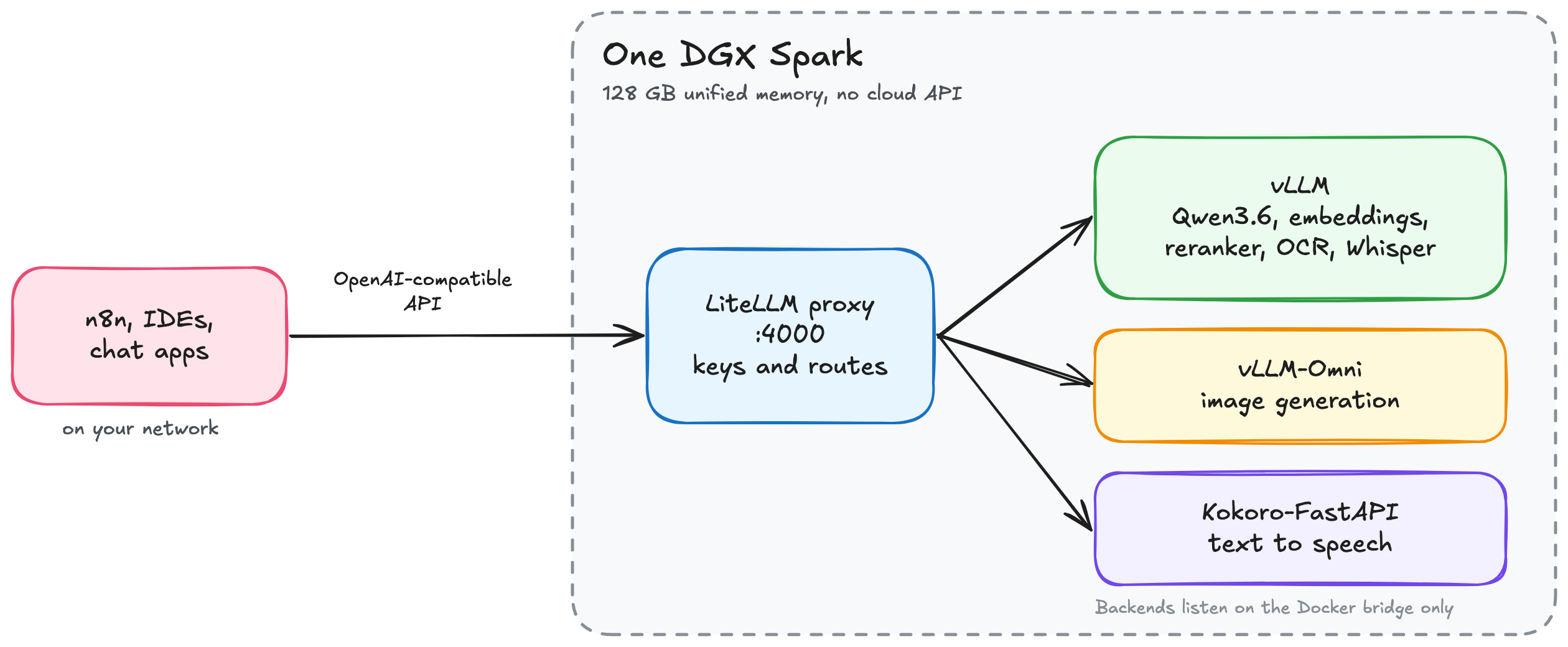
LiteLLM also handles virtual keys and per-team budgets in its open-source version, so a firm can give the accounts team access to the OCR and extraction routes while restricting the image generation route to the design department. The n8n blog notes that LiteLLM version 1.84.0 or later is required, because two earlier PyPI releases were backdoored in March 2026 and 1.84.0 fixed two authentication bypasses.
The underlying model server is vLLM (version 0.30.0 in the configuration tested), with a variant called vLLM-Omni handling image generation and speech modes. The n8n blog is careful to note that the team had to build a custom Docker wrapper because vLLM-Omni’s default entrypoint is not the standard vllm serve command.
The Limitations You Should Know About
This is a genuinely capable setup, but there are several honest constraints to weigh before you consider it.
What to Watch For
The n8n blog notes that faster FP4 kernels specifically optimised for the GB10 chip may raise token-generation speeds in future vLLM builds. The current configuration runs NVFP4 weights but executes the actual matrix math in 16-bit precision because native FP4 compute support is not yet available in this vLLM build — meaning the speed numbers in the blog may improve as the software matures.
If you are a decision-maker at a clinic, law firm, or financial services business exploring AI automation, the right starting point is not purchasing hardware. It is mapping which of your existing workflows touch sensitive data and would be blocked from using cloud AI. That list tells you whether the economics of a local stack justify the capital and operational overhead. The n8n team’s detailed guide at blog.n8n.io gives you the technical baseline to share with whoever would implement it.