I Tested 10 AI Tools So You Don’t Have To. Here Are the 3 Worth Paying For.
I have a confession. I spent three months and over $400 trying to find the AI tools worth paying for — so you don’t have to.
Over the past three months, I’ve been paying for 10 different AI tools simultaneously. ChatGPT Plus, Claude Pro, Gemini Advanced, Perplexity Pro, Jasper, Copy.ai, Midjourney, Notion AI, Otter.ai, and Gamma. That’s over $400 in subscriptions, running side by side.
I wasn’t collecting them like Pokémon. I was trying to answer a question I kept getting from readers after Post 1: “Which AI tools are actually worth paying for?”
Not worth trying. Not worth bookmarking. Worth paying for — with your own money, every month, because they save you more than they cost.
After 90 days, I cancelled 7 of them. Here’s the honest breakdown.
How I Tested the AI Tools Worth Paying For
I didn’t run synthetic benchmarks or test them with trick prompts. I used each tool for real work, every day, for the tasks I actually need to get done: writing blog posts, researching topics, drafting emails, creating presentations, summarizing documents, brainstorming ideas, and generating images.
My criteria were simple:
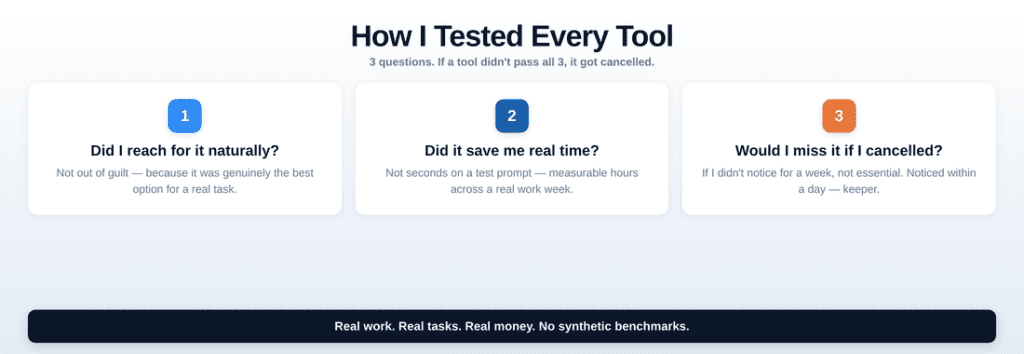
If a tool didn’t pass all three, it got cancelled. No exceptions.
The 3 AI tools worth paying for (and why I kept them)
Let me start with the winners. These are the tools I pay for today and will keep paying for.
1. Claude Pro — $20/month
What it does best: Thinking. Writing. Understanding long documents. Following complex instructions.
I switched from ChatGPT Plus to Claude Pro as my primary AI about four months ago, and I haven’t looked back. The difference is subtle but significant — Claude doesn’t just answer your question, it understands what you’re actually trying to do.
Where it shines: Writing anything longer than a paragraph. Uploading a 60-page PDF and asking nuanced questions about it. Using the RCTF framework from Post 2 — Claude responds to structured prompts better than any tool I’ve tested. The Artifacts feature lets it build documents, code, and diagrams inline. And the 200K context window means it can hold an entire project brief in memory.
Where it falls short: No image generation (you’ll need Midjourney or DALL-E for that). Voice mode exists but isn’t as natural as ChatGPT’s. The free tier is more limited than ChatGPT’s.
My verdict: If you write for a living, manage projects, or need a thinking partner — this is the one. It’s the tool I open first, every morning.
2. Perplexity Pro — $20/month
What it does best: Research. Finding information. Answering questions with sources.
Perplexity replaced Google for about 70% of my searches. Not because Google is bad — but because Perplexity gives me the answer directly, with sources I can verify, instead of making me click through 10 blue links and piece things together myself.
Where it shines: Any question where you need current, sourced information. “What did the Fed announce yesterday?” “What are the best project management tools for teams under 10?” “Summarize the latest research on AI in healthcare.” It searches the web in real-time, reads the results, and gives you a synthesized answer with clickable citations.
Where it falls short: It’s not a creative tool. Don’t ask it to write your emails or brainstorm campaign ideas — that’s Claude’s job. Its writing is serviceable but lacks personality. And sometimes it over-relies on a single source.
My verdict: If you spend more than 30 minutes a day researching, reading, or staying current on anything — this pays for itself in week one.
3. ChatGPT Plus — $20/month
What it does best: Everything a little bit. The Swiss Army knife.
I almost cancelled this one. With Claude as my primary and Perplexity for research, ChatGPT felt redundant. Then I realized I was still reaching for it three or four times a day — and each time, it was for something different.
Where it shines: Voice mode (genuinely useful for brainstorming while walking or driving). Image generation with DALL-E and Sora. The plugin ecosystem for niche tasks. Quick one-off questions where I don’t need Claude’s depth. Code execution and data analysis with the built-in interpreter.
Where it falls short: The writing feels more generic than Claude’s. Long documents lose coherence. It has a tendency to be agreeable rather than pushback when your idea is bad — Claude is more honest.
My verdict: Keep it if you can afford the $20/month alongside Claude. Drop it if you can only pay for one — in that case, Claude wins.
The 7 AI Tools Not Worth Paying For (and Why I Cancelled)
Now the part that might save you real money.
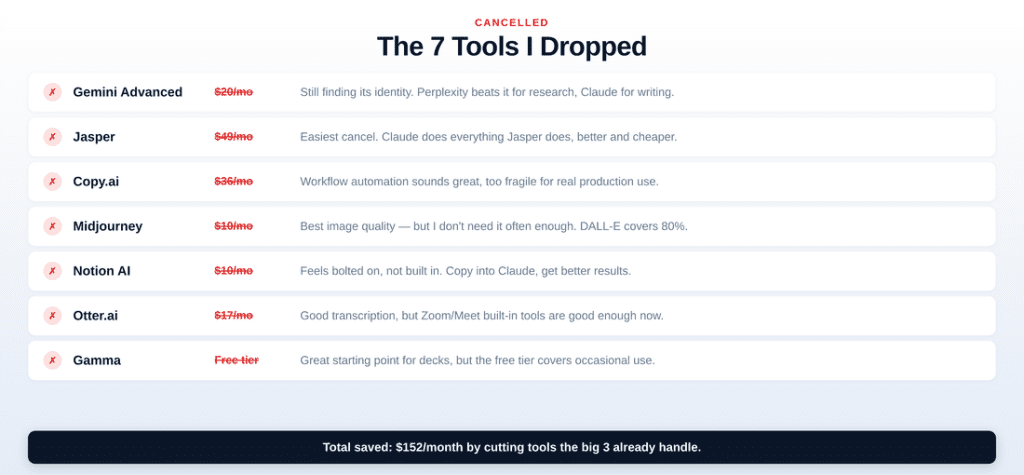
Gemini Advanced — $20/month → Cancelled
Why I dropped it: Despite Google’s massive investment, Gemini still feels like it’s searching for an identity. Deep Research is impressive for one-off investigations, but Perplexity handles daily research better. The Google Workspace integration sounds great in theory but is clunky in practice. Writing quality is a clear tier below Claude.
When to keep it: Only if you’re deeply embedded in Google Workspace and want AI integrated directly into Docs, Sheets, and Gmail. Even then, I’d wait 6 months — it’s improving fast.
Jasper — $49/month → Cancelled
Why I dropped it: This was the easiest cancel. Jasper was the darling of AI writing tools in 2023, but ChatGPT and Claude have completely caught up — and they’re cheaper. Paying $49/month for something that $20/month Claude does better felt absurd.
When to keep it: If you run a marketing team that needs brand voice templates and team collaboration features around AI content. But honestly, even then — Claude with a good system prompt gives you brand-consistent output.
Copy.ai — $36/month → Cancelled
Why I dropped it: Same problem as Jasper but with a workflow-automation angle that sounds better than it works. The templates are fine but not better than a well-crafted prompt. The “AI workflows” feature is genuinely interesting but still too fragile for production use.
Midjourney — $10/month → Cancelled (with a caveat)
Why I dropped it: The images are beautiful — still the best aesthetic quality of any AI image generator. But I don’t need professional illustrations often enough to justify even $10/month. When I do need an image, ChatGPT’s DALL-E handles 80% of cases.
Notion AI — $10/month per member → Cancelled
Why I dropped it: I love Notion. I use it every day. But Notion AI feels bolted on rather than built in. The AI features are basically ChatGPT queries wrapped in Notion’s interface — but more limited and less flexible. I’d rather copy text into Claude, get a better result, and paste it back.
Otter.ai — $17/month → Cancelled
Why I dropped it: Otter is a good transcription tool. But Google Meet, Zoom, and Microsoft Teams all have built-in transcription now — and it’s good enough. The AI-generated meeting summaries from Otter are nice but not $17/month nice when Claude can summarize a transcript just as well.
Gamma — Free tier → Didn’t upgrade
Why I stayed free: Gamma makes surprisingly good presentations from a text prompt. But the free tier gives you enough credits for occasional use, and the presentations still need significant editing to look professional.
The AI tools worth paying for — my recommended stack
After 90 days and $400+ in testing, here’s the stack that delivers the most value:
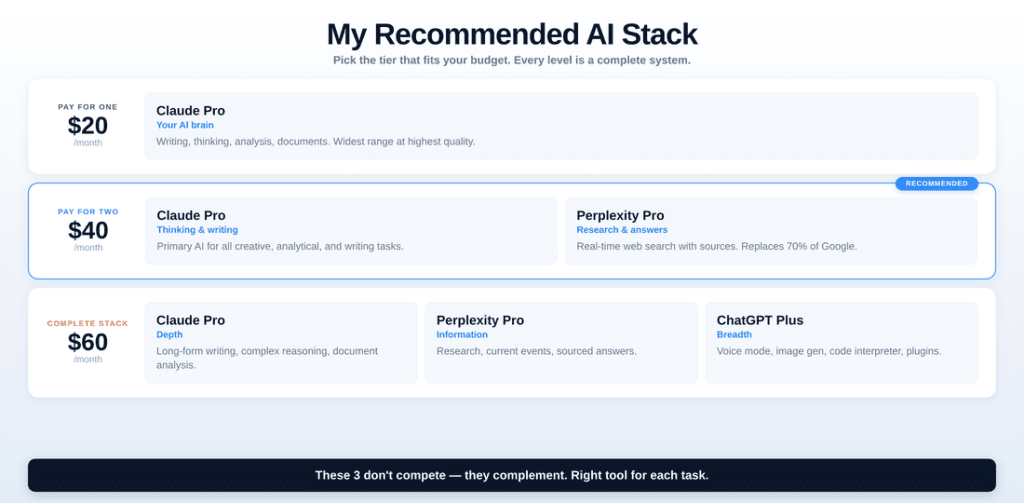
If you can only pay for one: Claude Pro ($20/month). It covers the widest range of tasks at the highest quality.
If you can pay for two: Claude Pro + Perplexity Pro ($40/month). Thinking + research. This covers 90% of professional AI use cases.
If you can pay for three: Claude Pro + Perplexity Pro + ChatGPT Plus ($60/month). The complete stack. Thinking + research + everything else.
These are the AI tools worth paying for in 2026. The key insight: they don’t compete — they complement. Claude for depth, Perplexity for information, ChatGPT for breadth. You stop trying to force one tool to do everything and instead use the right tool for each task.
The Bigger Lesson: Which AI Tools Are Worth Paying For?
The AI tools market is flooded with specialized products that solve narrow problems — problems that the big three (ChatGPT, Claude, Gemini) are rapidly absorbing. In 2023, you needed 5 tools. In 2026, you need 2-3.
This trend will continue. Every year, the general-purpose models get better, and the niche tools need to justify their existence against a baseline that keeps rising.
My advice: Don’t collect tools. Master one. Pay for it. Learn its quirks, its strengths, its weaknesses. Build workflows around it. A professional who’s excellent with one AI tool will outperform someone who’s mediocre with five.
Your homework
Look at your AI subscriptions right now. How many are you paying for? How many did you use in the past week — for real work, not just testing?
Cancel the ones you haven’t touched in 2 weeks. Focus on AI tools worth paying for — the ones that save you real time. Redirect that money to getting better with the tools you actually use. And if you’re not paying for any AI tool yet — start with one. Today.
The $20/month that feels expensive now will feel like the best investment of your career in 6 months.
This is Post 4 of The Prompt Mind. Catching up? Start with Post 1: The No-BS Guide, then Post 2: The RCTF Framework, then Post 3: AI Agents & Your Job. New essays every week. Subscribe below.