
The Prompt Framework I Use for Everything: Role → Context → Task → Format
Here’s a secret about people who are “great with AI” — and how the RCTF prompt framework changes everything.
They’re not smarter. No better subscriptions, either. In fact, most haven’t taken a $500 prompt engineering course. The only difference is they know how to ask.
Honestly, that’s the whole thing.
I’ve used this framework hundreds of times — for cold emails, product briefs, meeting agendas, performance reviews, research summaries, social media posts, and things I probably shouldn’t admit in public. It works every single time, across every AI tool I’ve tested.
It takes about 30 seconds to use. And it will fundamentally change the quality of what you get back from AI.
I call it the RCTF prompt framework.
The framework: Role → Context → Task → Format
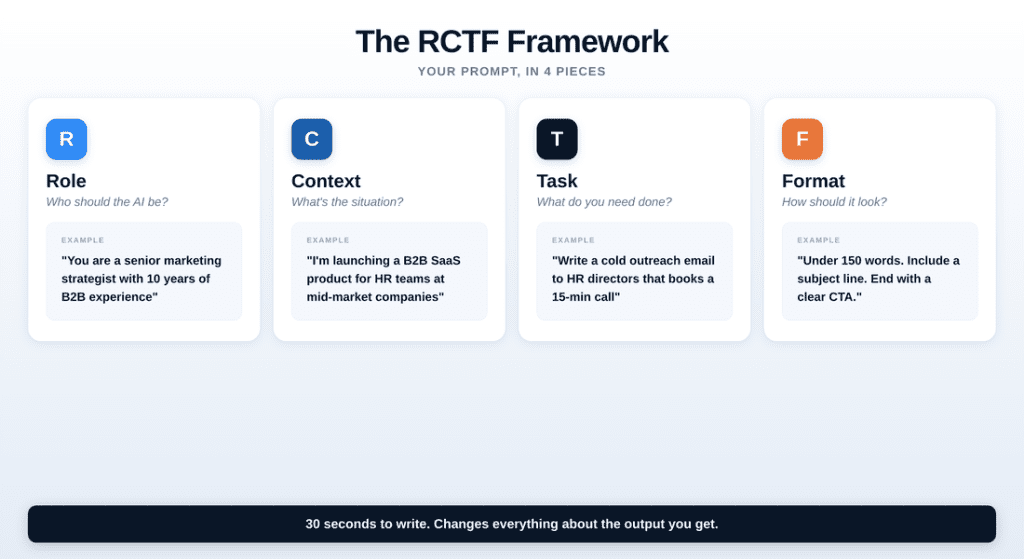
Four pieces of information. That’s all you need to give AI before asking it to do anything. However, miss one, and the output drops. Use all four, and you’ll consistently get output that’s 80% ready to use — sometimes 95%.
Let me break each one down.
R — Role: Tell the AI who to be
This is the piece most people skip entirely. And it might be the most important one.
When you say “You are a senior marketing strategist” or “Act as an experienced product manager,” you’re not just being cute. You’re activating a completely different set of patterns in how the AI responds.
A “marketing strategist” writes differently than a “copywriter.” A “data analyst” structures information differently than a “journalist.” The role shapes everything — vocabulary, structure, depth, assumptions.
Good roles to try:
“You are a senior product manager at a SaaS company” — for strategic thinking
“You are a direct, no-nonsense executive coach” — for feedback
“You are an experienced copywriter who hates fluff” — for tight writing
“You are a thoughtful teacher explaining to a smart 15-year-old” — for simplification
The trick: the more specific the role, the better the output. “Writer” gives you nothing. “Experienced B2B SaaS copywriter who specializes in cold emails” gives you gold.
C — Context: Tell the AI what it doesn’t know
Indeed, this is where the magic happens.
AI has no idea who you are, what industry you’re in, who your audience is, or what you’ve already tried. Without context, it has to guess. And when AI guesses, you get the generic, corporate-sounding filler that makes people say “AI isn’t useful.”
In other words, context is anything that helps the AI understand your specific situation:
What to include:
Your industry or company type — “I run a 12-person design agency”
Your audience — “Writing to CFOs at mid-market companies”
Constraints — “Budget is $5K, timeline is 2 weeks”
What’s already happened — “The client rejected our first proposal”
Your relationship to the task — “I’m new to this role”
Think of it this way: if you were explaining the task to a smart colleague who just joined your team, what would they need to know to actually help? That’s your context.
T — Task: Tell the AI exactly what you need done
This sounds obvious but most prompts fail here. People say “help me with this email” when they mean “write a follow-up email to a client who went silent after our second call.”
The more specific the task, the more useful the output.
Vague tasks (bad): “Write something about our product.” “Help me prepare for the meeting.” “Create a social media strategy.”
Specific tasks (good): “Write a 3-paragraph product announcement for LinkedIn.” “Create a list of 5 tough questions the board might ask about our Q2 numbers, and draft 1-sentence answers for each.” “Write 5 tweet-length hooks for our new feature launch, each taking a different angle.”
One rule: one task per prompt. If you need three things, make three prompts. After all, AI does one thing well at a time.
F — Format: Tell the AI how the output should look
This is the piece that turns a “pretty good” answer into something you can actually use without editing.
Notably, without format instructions, AI defaults to its own preferences — which usually means too long, too many bullet points, and a tone that sounds like a corporate brochure.
Format includes:
Length — “Keep it under 150 words” or “2-3 paragraphs max”
Tone — “Casual and direct, like texting a colleague” or “Formal but warm”
Structure — “Use numbered steps” or “Write it as a narrative, no bullets”
Examples — “Include a concrete example for each point”
What to exclude — “No jargon. No filler. No ‘In today’s fast-paced world.'”
Pro tip: telling AI what not to do is just as powerful as telling it what to do. “Don’t start with a greeting” or “Skip the introduction and go straight to the recommendation” — these constraints force better output.
The framework in action: 3 real examples
Of course, theory is nice. Let’s see it work.
Example 1: The cold email
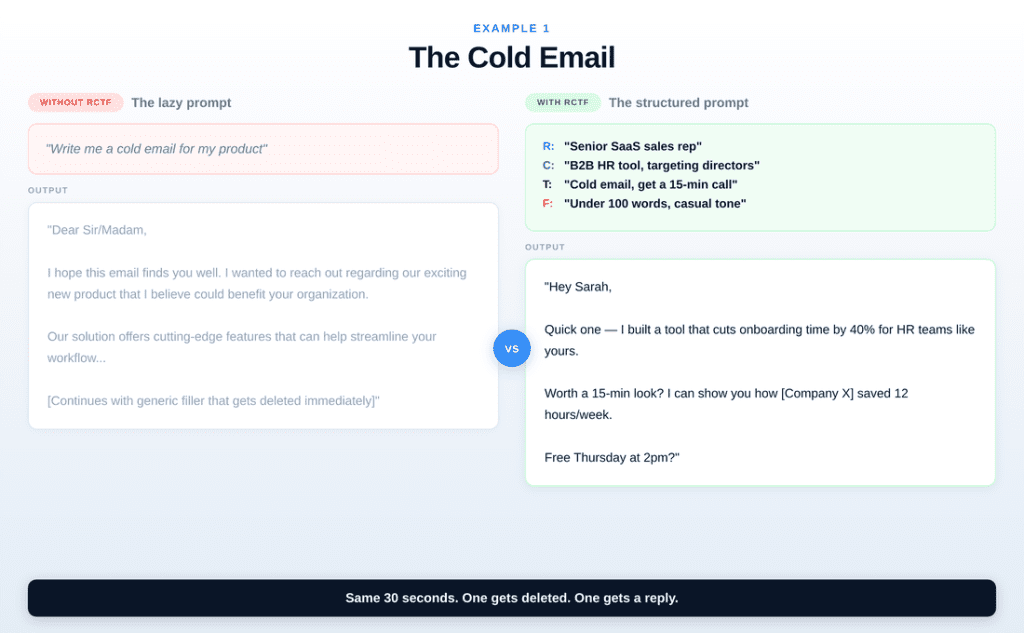
The left side is what most people type. The right side is what happens when you spend 30 extra seconds filling in the four pieces. Same AI. Same tool. The difference is entirely in the asking.
Notice how the RCTF version produces an email with a specific value proposition, a named metric, a clear CTA, and a casual tone — all because the prompt specified those things.
Example 2: The meeting agenda
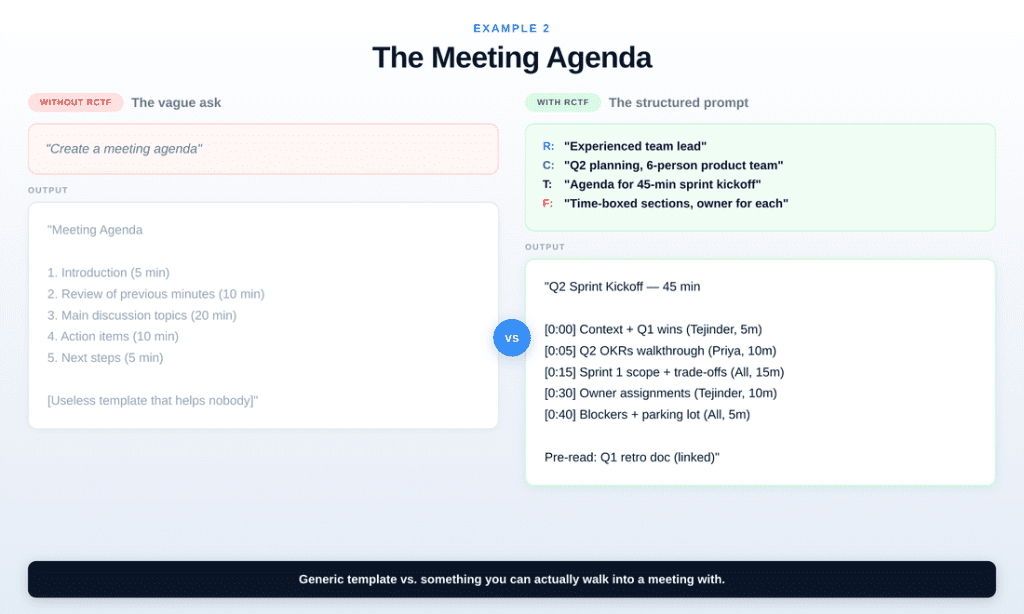
Without RCTF, you get a template from 2005. With RCTF, you get something you can actually paste into a calendar invite and walk into the room with.
The key difference? Context. Once the AI knows it’s a 45-minute sprint kickoff for a 6-person product team, it can make intelligent decisions about time-boxing and structure.
Example 3: The performance review
Here’s one you can copy right now:
R: “You are an experienced people manager who gives feedback that’s direct but empathetic.”
C: “I manage a mid-level designer who does excellent visual work but consistently misses deadlines and doesn’t communicate blockers early enough. This is their annual review.”
T: “Write the ‘areas for improvement’ section of their performance review. Include specific behavioral examples I can customize.”
F: “3 paragraphs. Start with what’s working (briefly), then the growth area, then a clear expectation for next quarter. Professional but human tone — not corporate HR-speak.”
So, try that prompt. The output will be eerily close to something a thoughtful manager would write. And it’ll take you 2 minutes instead of 45.
Why this works (the short version)
Essentially, AI models are pattern machines. This is why the RCTF prompt framework works so well. When you give them a vague prompt, they reach for the most average pattern — the most generic response that could satisfy the widest possible interpretation of your request.
Simply put, you’re being a good collaborator. And good collaborators give clear briefs.
Specifically, RCTF narrows the search space. Role tells it how to think. Context tells it what to think about. Additionally, task tells it what to produce. Format tells it how to deliver.
RCTF prompt framework: Common mistakes (and how to fix them)
Mistake 1: Skipping Role. Most people jump straight to “Write me an email.” Without a role, the AI defaults to “generic helpful assistant” mode — which produces generic helpful output. Add a role. Always.
Mistake 2: Writing a novel for Context. You don’t need 500 words of background. 2-3 sentences is usually enough. Think: what’s the minimum context that changes the output?
Mistake 3: Combining multiple tasks. “Write a strategy deck, then summarize it, then turn it into talking points.” That’s three prompts. Do them separately. Chain the outputs.
Mistake 4: Forgetting Format. This is why people spend 20 minutes editing AI output. If you’d said “under 100 words, no bullet points, casual tone” upfront, the output would’ve been 90% ready.
The cheat sheet
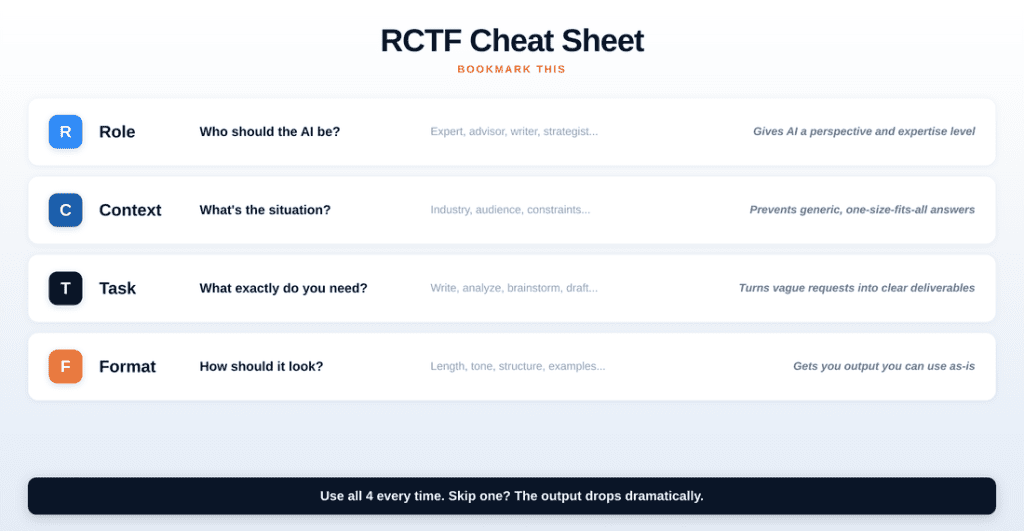
Save this. Screenshot it. Stick it wherever you keep things you actually use.
Your homework
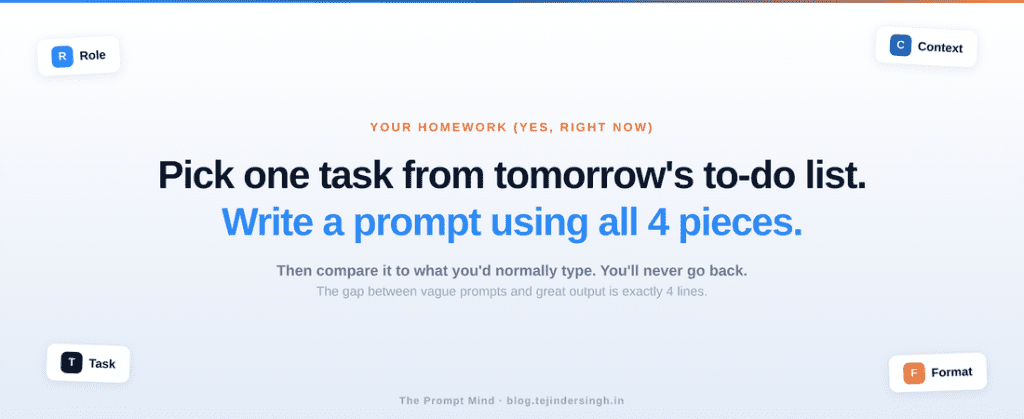
Here’s what I want you to do: pick one real task from your to-do list tomorrow. Before you open ChatGPT or Claude, write down the four pieces:
R: Who should the AI be? C: What’s the situation? T: What exactly do I need? F: How should it look?
Then type it in. Compare the output to what you’d normally get. You’ll see the difference in the first 10 seconds.
And once you see it, you can’t unsee it. Every vague prompt will feel like leaving money on the table.
This is Post 2 of The Prompt Mind. If you missed Post 1, start with The No-BS Guide to Getting Started with AI in 2026. New essays every week. Subscribe below.
Hi, this is a comment.
To get started with moderating, editing, and deleting comments, please visit the Comments screen in the dashboard.
Commenter avatars come from Gravatar.